Latest Updates: ECU ISOBUS
15 Jun 2026
The 1.9.1 version is now available
All latest updates have been applied to enhance user experience, improve safety during tests, and ensure better control over the system's calibration and operation.
Improvements
Here, we outline the various optimizations and refinements made to existing features. These changes are designed to improve performance, usability, and overall user satisfaction.
New TC Button Status Signaling
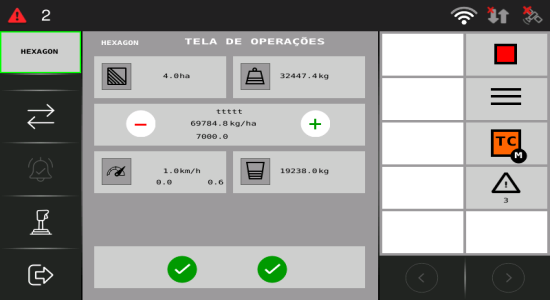
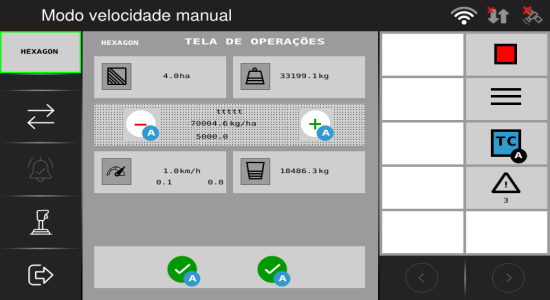
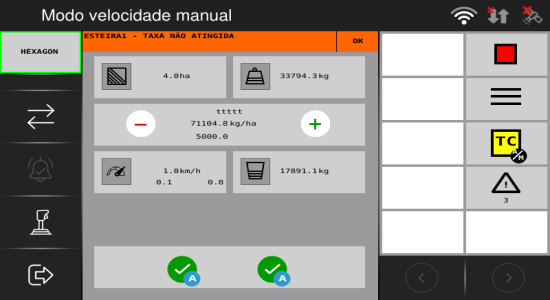
Version 1.9.0 updates how the TC (Task Controller) button represents status. In earlier versions, we used only text to indicate what was happening. Now, the TC button will have a color and a letter to indicate the current status. The table below compares the old states with the new labels and colors.
| Control scenario | Version 1.8.0 or earlier | Version 1.9.0 | ||
|---|---|---|---|---|
| Status (text only) | Status | Who controls | Button color | |
| The TC is connected, but the TC Server is not controlling the implement (manual mode does not accept commands from the TC Server). | Not controlling / Cannot control | M (Manual) | Controlled via VT (Virtual Terminal) | Orange |
| TC is actively controlling all functions and operations as programmed and configured (variable rate and sections). | Controlling everything (variable rate and section control) | A (Automatic) | Fully controlled via TC | Blue |
| The TC controls only specific parts of the system—e.g., the sections or the rate—instead of all functions. Useful in situations where segmented or individualized operation is required. | Controlling only the sections / Controlling only the rate | A/M (Manual / Automatic) | VT + TC (combination depending on the scenario) | Yellow |
The image below illustrates how the TC status button is now displayed in the interface.
Improvement to saving settings
The logic for saving configuration files has been adjusted so that after the operator confirms changes by clicking OK, they are effectively saved when navigating to Operation, returning to the main menu, or pressing Home. This prevents situations where adjustments appeared to be accepted but were lost after a restart.
Bug Fixes
This section addresses the issues identified in previous versions and details the fixes implemented. These corrections enhance system stability and ensure a smoother, more reliable operation.
Consistent Spanish language display on the VT
You can now see all VT screens, menus, and alarms fully translated into Spanish when your display is set to Spanish.
Deadband adjustment in open-loop tests
During open-loop testing of the ISOBUS VRT ECU, the deadband configuration was being applied in the same way as in closed-loop mode, affecting results that should reflect the actuator’s “pure” response. The test logic has been adjusted so that open-loop tests now ignore the deadband.
Fix for serial log issue caused by the converter
In some tests, the serial port was receiving too many logs, which interfered with the execution of automated tests. After investigating, we found that the issue was not with the system under test, but with an infrastructure adapter. That equipment was replaced and the failure was fixed.